
Short answer: not for one laptop, yes for anything that matters. If it is just you and Ollama on a MacBook, the terminal and a browser tab are enough. The longer answer depends on what you run. People who run LLM locally tend to picture the giant models from launch headlines, but the models that actually get run day to day are small. In our 200-model database, 93 models have 8 billion parameters or fewer, and every one of them fits in 8 GB of memory or less. Managing a stack like that from a phone is realistic. Managing a rack-scale model from a phone is a different claim, and the data shows exactly where the line sits.
Size decides what a phone can manage
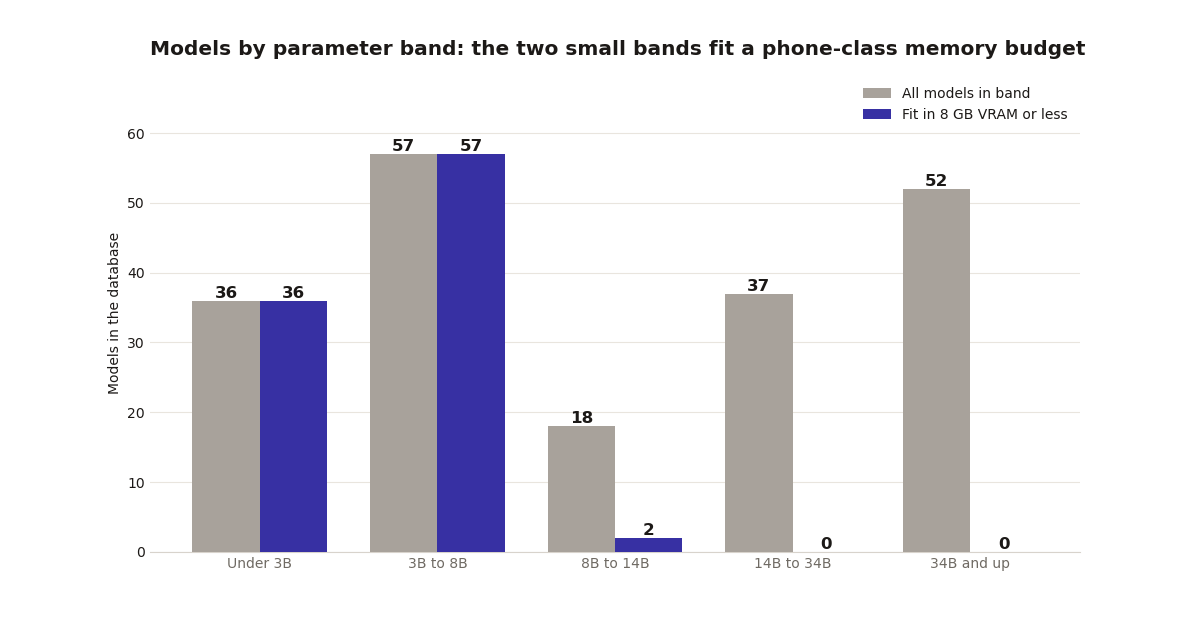
The bands tell the story. All 36 models under 3B parameters record minimums of 4 or 5 GB. All 57 models in the 3B to 8B band fit within 8 GB. The 8B to 14B band is the border: 18 models with minimums from 8 to 12 GB, and only 2 of them stay at or under 8 GB. Above that line the phone stops being a plausible host and becomes a remote control at best: none of the 37 models in the 14B to 34B band, and none of the 52 models above 34B, fit in 8 GB.
So the honest split is this. If your local stack lives in the two small bands, a mobile app can be a genuine management surface: start, stop, swap, and watch a model that belongs to the same memory class as the phone itself. If your stack lives in the big bands, the app on your phone is a pager and a dashboard for a machine somewhere else. That is still useful. It is just a different job, and buying the first kind of app to do the second kind of job is how people end up disappointed.
There is also a middle case worth naming: the laptop-class stack. 122 of the 200 models in the database fit in 16 GB of VRAM or less, which covers most gaming laptops and compact desktops. For that tier, a phone app is neither host nor mere pager. It is a remote start and a status light for a machine in the next room. Most solo builders live in this tier, and for them the right move is the lightest management layer that adds alerts and a restart button, not a full console with roles and audit trails. Match the app to the tier your models sit in and the whole question gets much simpler.
Four signs you need mobile management
You need mobile management when any of these are true. 1) The model serves other people: a team, customers, or a second office. 2) Uptime matters: a crashed model at 2am should page your phone, not wait for morning. 3) Compliance: audit logs and access control stop being optional around client data. 4) Cost: once usage crosses a few hundred dollars a month in equivalent API spend, metering pays for itself.
A mobile admin app turns being the AI person into a push notification. PrivateLLM deploy includes iOS and Android admin apps with its $50 plus usage service, so the business owner is never chained to a desk. Start simple, add management when the pain shows up.
Check your band first
Not sure which band your shortlist sits in? The Will It Run? checker takes your machine RAM and VRAM and sorts all 200 models in our database into fits and near misses. Run it before you shop for management apps: the result tells you whether you need a phone app that hosts, a phone app that monitors, or no phone app at all. Five minutes of checking beats a month of forcing the wrong tool into the job.
Related reading
For the hands-on setup, How to Chat With a Local LLM From Your Phone: The Two-Setup Guide walks through both routes. The app shortlist itself is in Mobile Admin Apps for Your Local AI Stack, and Apps for Running LLMs on Your Phone: What Actually Works covers what phone hardware can genuinely host.
Sources: Hugging Face | Ollama